The best website builder is not necessarily the one with the most features. It is the one that gives you the right balance of ease of use, design freedom, functionality, and price for the website you actually want to build.
After trying the most popular options, I found some clear differences. A platform that makes it incredibly easy to launch a simple business website can feel restrictive when you want a custom design. And a tool that gives you complete control can take considerably longer to learn.
Here is how GoDaddy, Squarespace, Wix, Webflow, Shopify, and WordPress compare, including where I would recommend each one and where I would choose something else.
Pricing note: Prices, plan names, template counts, and trial offers below reflect the options available when I tested these platforms. They are useful comparison points, not guaranteed current offers. Check the latest terms before signing up.
This comparison is not sponsored by any of these providers. Some links are affiliate links, which means I may earn a commission if you purchase through them, at no additional cost to you.
Table of Contents
- Key Takeaways
- GoDaddy: Best for Getting a Simple Website Online Quickly
- Squarespace: Best Balance of Flexibility and Ease of Use
- Wix: Best for Template Variety and Flexible Page Design
- Webflow: Best for Designers Who Want Maximum Design Freedom
- Shopify: Best for Building an Ecommerce Website
- WordPress: Best for Long-Term Control and Flexibility
- Which Website Builder Should You Choose?
Key Takeaways
- GoDaddy prioritizes simplicity, while Squarespace and Wix offer progressively more design flexibility.
- Webflow provides detailed design control but takes more time to learn and use.
- Shopify is my top recommendation when selling products is the website’s main purpose.
- WordPress offers extensive control in exchange for more learning and website management.
GoDaddy: Best for Getting a Simple Website Online Quickly
GoDaddy is an all-in-one website builder that includes hosting, customizable themes, a visual editor, and additional tools for email marketing and ecommerce.
Getting started is very straightforward. You choose the type of website you want to create, give it a name, and GoDaddy generates a premade website. From there, you select a theme and replace the content with your own.
A structured editor keeps things simple
The most important thing to understand is that GoDaddy does not give you a freeform drag-and-drop editor. You cannot simply put text or images anywhere on the page. Instead, you work within predetermined layouts and positions.
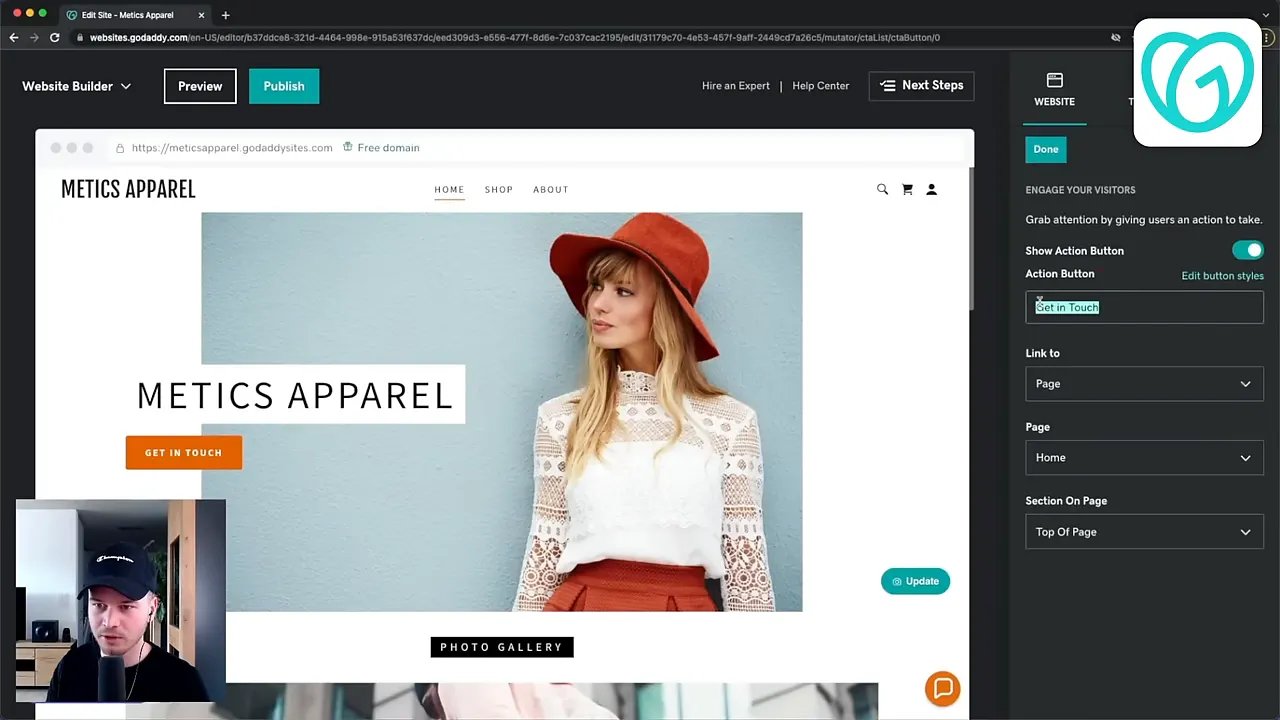
That limitation has a real benefit: building your website is faster, and there is less opportunity to create a messy layout. The structure also handles much of the mobile formatting for you, so you do not have to spend as much time adjusting your content for smaller screens.
The trade-off is design flexibility. If you have a very specific layout in mind, GoDaddy may not let you achieve it.
Its email marketing, blogging, and ecommerce features cover the basics. For a simple website, that may be enough. If you need more advanced functionality in those areas, I would look at the other options.
GoDaddy pricing
- Free plan: Available with a GoDaddy domain and an advertisement at the top of the website.
- Basic plan: Started at about $10 per month with annual billing, allowing a custom domain and removing the ad.
- Commerce plan: Started at about $17 per month with annual billing for selling products.
Monthly billing was more expensive than paying annually. For most simple websites, the Basic plan was likely sufficient.
My recommendation: Choose GoDaddy if you want a simple, affordable website without spending much time learning an editor or fine-tuning a design.
Squarespace: Best Balance of Flexibility and Ease of Use
Squarespace gives you more room to customize your website than GoDaddy, without becoming overly complicated for beginners. Personally, I think this balance is one of its biggest strengths.
At the time of my comparison, Squarespace offered close to 150 templates across categories such as photography, local businesses, and restaurants. All were included at no extra charge, with the clean, modern design style Squarespace is known for.
Drag-and-drop design with Fluid Engine
Squarespace’s Fluid Engine lets you arrange content using drag and drop. That makes it much easier to move beyond a fixed layout and get closer to the design you have in mind.
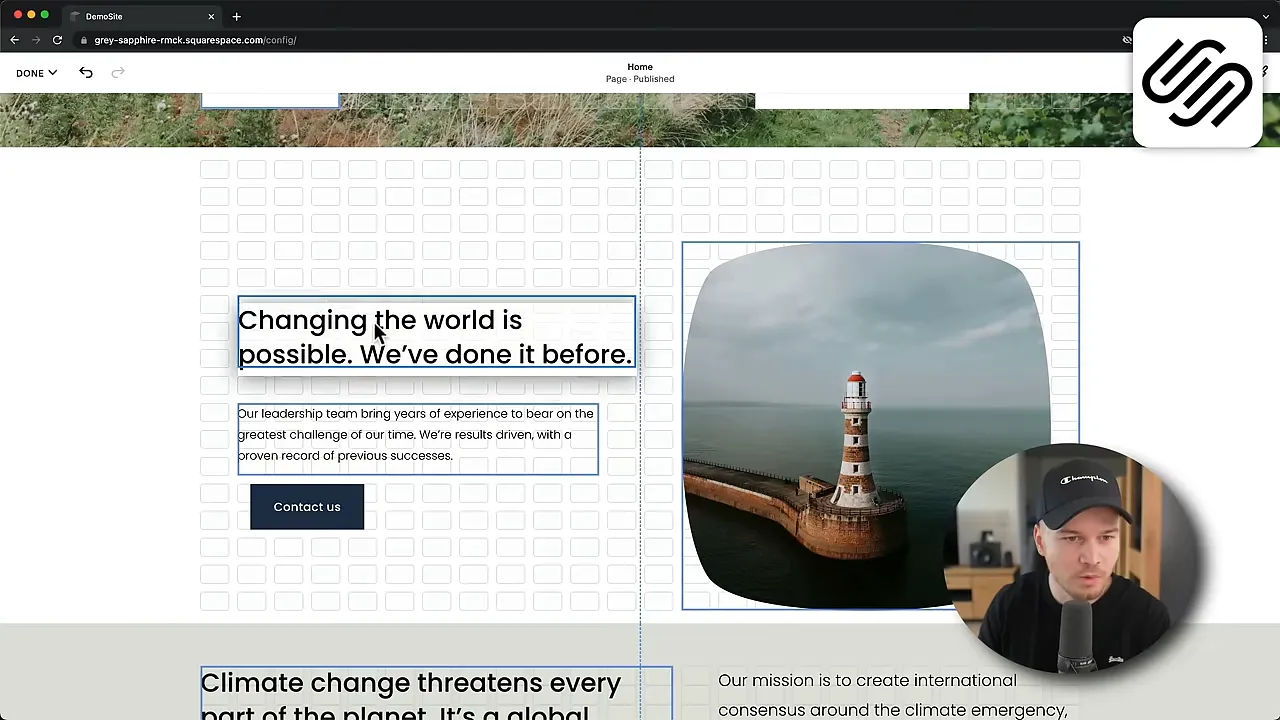
You get plenty of customization options, but the experience still feels approachable. If GoDaddy seems too restrictive and you do not want the complexity of a more advanced design tool, Squarespace is a strong middle ground.
A particularly good option for blogging
If you want to start a blog, Squarespace is also a good alternative to WordPress. You can create and manage your content without assembling a collection of plugins for the essential blogging tools.
Its blogging and content features include:
- Search engine optimization options.
- Tags and categories to organize posts.
- Newsletter functionality.
- Members-only areas for exclusive content.
- Podcast hosting through your website.
For someone who wants an all-in-one blogging platform, I would personally choose Squarespace over Wix. From what I have used, its blogging features feel more sophisticated.
Squarespace pricing
Squarespace did not offer a permanent free plan, but it did offer a 14-day free trial.
- Personal: $16 per month with annual billing, or $23 when paid monthly.
- Business: Started at $23 per month with annual billing and supported ecommerce, with a 3% platform transaction fee.
- Commerce: Started at $27 per month with annual billing and removed that 3% platform transaction fee.
The platform transaction fee is a separate consideration from payment processing costs. When comparing ecommerce plans, make sure you understand which fees a plan removes.
My recommendation: Choose Squarespace if you want an easy-to-use website builder with attractive templates, useful blogging tools, and enough flexibility to make the website your own.
For help getting started, my Squarespace beginner tutorial walks through the setup process.
Wix: Best for Template Variety and Flexible Page Design
Wix stands out for its combination of template choice and design freedom. When I tested it, there were more than 800 templates, all available at no extra charge.
That gives you a wide range of starting points, whether you are creating a personal website, a business website, or something more specialized.
More freedom means more responsibility
Like Squarespace, Wix has a drag-and-drop website builder. In my experience, it gives you even more freedom to position and customize elements.
However, that freedom also makes it easier to misalign things. I found that building a clean layout required more care, and optimizing the mobile version usually took me longer than it did with Squarespace.
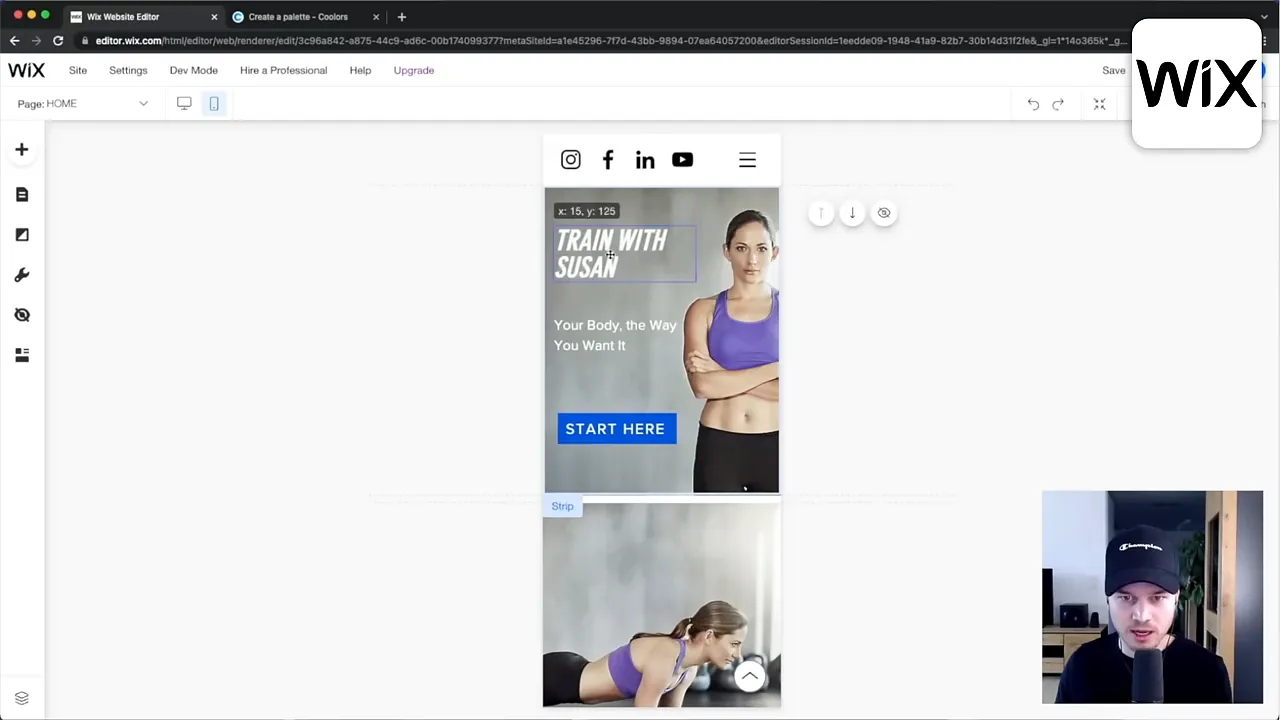
This is not necessarily a reason to avoid Wix. It is simply the trade-off: you get more control, but you also have more layout decisions to manage.
Extend your website with apps
Another important advantage is the Wix App Market. Independent developers can create applications that add features to your website. At the time of testing, the marketplace had more than 300 apps, many of them free.
Wix also supports blogging and online stores. I think it is a good ecommerce option for a small store, especially if you already have a Wix website and want to add a few products.
If selling products is the main purpose of your website, though, I would choose Shopify instead. And if blogging is your main priority, Squarespace would be my preference among these two all-in-one builders.
Wix pricing
- Free plan: Required a Wix domain and displayed Wix advertisements.
- Entry paid plan: Started at $16 per month, with a custom domain and no Wix ads.
- Annual-plan domain benefit: Included a free domain for the first year on the qualifying plan.
- Business and ecommerce plans: Started at $27 per month for selling products.
My recommendation: Choose Wix if you want a large selection of templates and substantial design flexibility within an all-in-one platform, and you are happy to spend some extra time refining layouts.
Webflow: Best for Designers Who Want Maximum Design Freedom
Webflow takes visual website building further. It gives you more detailed control over the design than Wix or Squarespace, including the ability to fine-tune layouts for different screen sizes.
That makes it a great option for designers and developers who want to create something highly customized or more complex than a typical template-based website.
Powerful, but not the easiest starting point
I have had a lot of fun building with Webflow because you can get very creative. But it takes more time, both to learn the platform and to build the website.
I would not recommend it as the first choice for a complete beginner who simply wants to get a website online as quickly as possible.
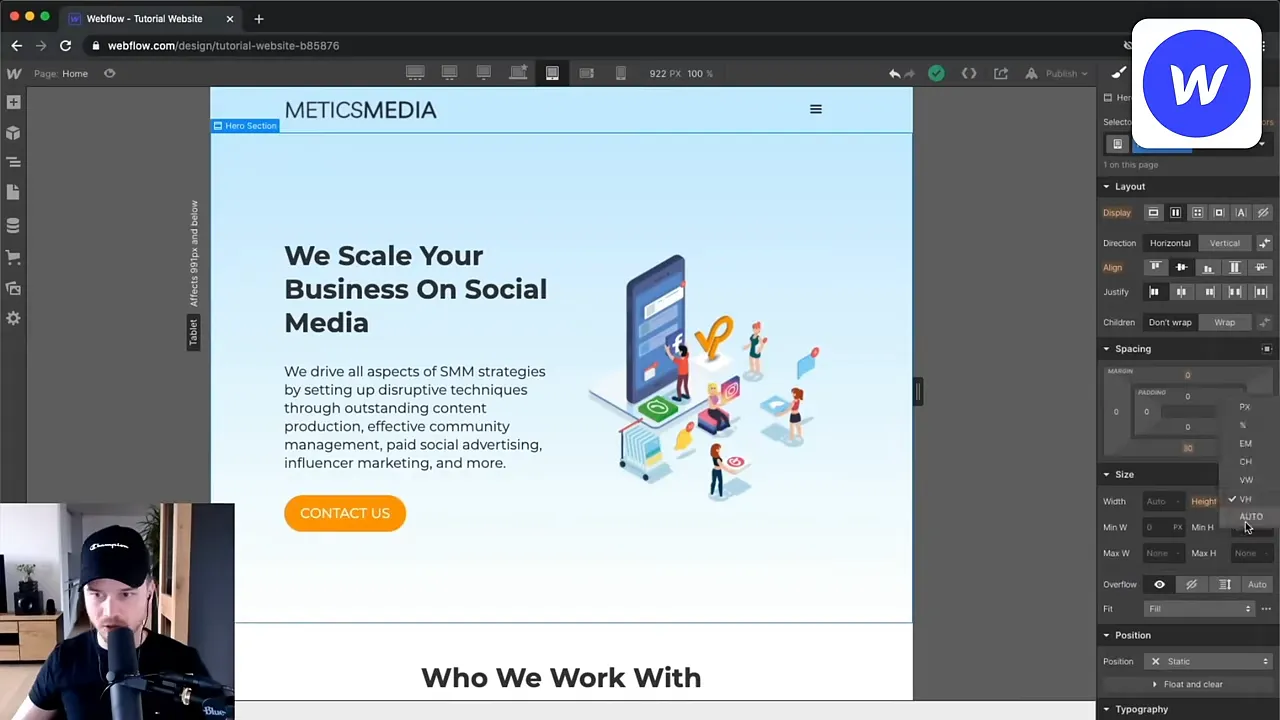
If your priority is a ready-to-go website with minimal setup, one of the simpler builders is a better fit. If your priority is creating a particular design and you are willing to learn the tool, Webflow becomes much more appealing.
Templates, apps, and content tools
Webflow has an open marketplace for apps and templates. At the time of my comparison, it offered more than 1,500 website templates. Some were free, while paid examples commonly cost between $50 and $100.
You can also use Webflow to build a blog or an online store, so it is not limited to static business websites.
Webflow pricing
- Free plan: Allowed publishing on a Webflow domain.
- Paid website plans: Started at $14 per month with annual billing for connecting a custom domain.
- Ecommerce plans: Started at $29 per month.
Choose a plan based on the functionality you need, not only whether it supports a custom domain. Blogging and ecommerce requirements matter too.
My recommendation: Choose Webflow if design control matters more than speed and simplicity. It is especially well suited to designers and developers who want to build a genuinely custom website.
My one-hour Webflow beginner tutorial provides a practical starting point for learning the platform.
Shopify: Best for Building an Ecommerce Website
Shopify is designed specifically for online stores and ecommerce businesses. If your website’s main purpose is not selling products and accepting payments, there is little reason to prioritize it over the other options.
If you are creating an online store, however, Shopify is my top recommendation for getting a powerful ecommerce website up and running quickly.
A straightforward store editor
Shopify’s standard theme editor is more structured than the freeform editors in Wix or Webflow. You add sections and elements, then customize them through the editing controls.
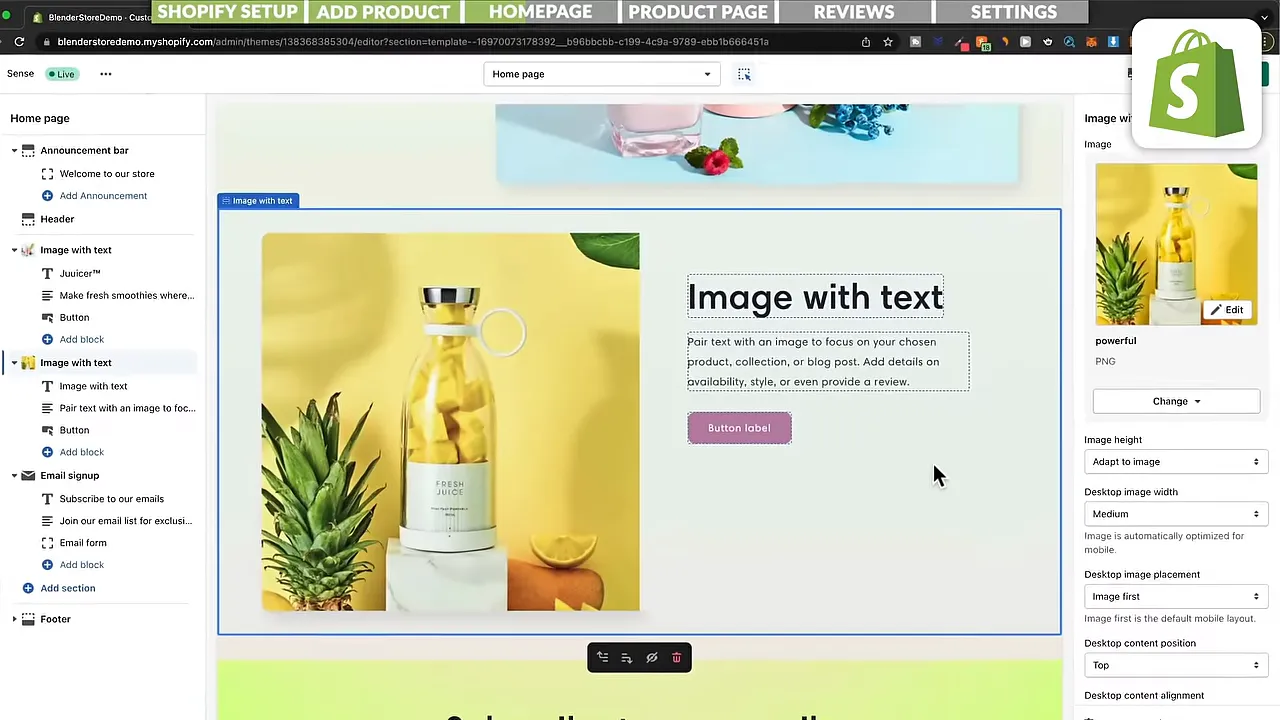
This limits design freedom, but it makes building your store easier and faster. The responsive layouts also help your store work well on mobile devices without requiring you to design every screen size from scratch.
If you want more visual freedom, you can install a third-party page builder such as GemPages to add a drag-and-drop editing experience.
An extensive ecommerce app ecosystem
At the time of testing, the Shopify App Store had more than 8,000 apps. That gives you a huge range of options for extending your store with additional functionality.
The theme selection was smaller than those of some general-purpose website builders: a little over 100 store themes, with 11 free options. Paid themes generally cost between $200 and $350.
Shopify is therefore not the cheapest option, particularly if you choose a paid theme and additional apps. Its main appeal is having an all-in-one platform built around ecommerce.
Shopify pricing and trial
Shopify offered a three-day free trial when I tested it. The entry paid plan started at $29 per month with annual billing, or $39 when paid monthly.
I also had a referral offer for three additional months at $1 per month after the initial trial. Promotional terms can change, so check the offer page for current eligibility and pricing.
My recommendation: Choose Shopify if selling products is your main goal and you are comfortable spending a little more for a dedicated ecommerce platform.
WordPress: Best for Long-Term Control and Flexibility
WordPress is different from the other options in this comparison. Here, I mean the self-hosted WordPress content management system, rather than an all-in-one hosted website builder.
It is an extremely popular platform. At the time of my research, it powered more than 43% of websites. That popularity also means there is a huge amount of educational material available when you need help.
More control, but more to manage
With WordPress, you need to arrange hosting and take responsibility for aspects of website management such as security.
That requires more technical understanding than a platform such as Wix or Squarespace. Learning WordPress can feel overwhelming at first, especially if you have never built a website before.
The benefit is control. You are not confined to one provider’s built-in feature set, and you have much more freedom to expand your website in the future.
Plugins and themes provide room to grow
At the time of my comparison, WordPress offered more than 55,000 plugins. Plugins are pieces of software that add functionality, much like apps on Wix or Shopify.
They can add features such as ecommerce, social media integrations, search optimization tools, and much more. The official WordPress plugin directory is a useful place to explore the available options.
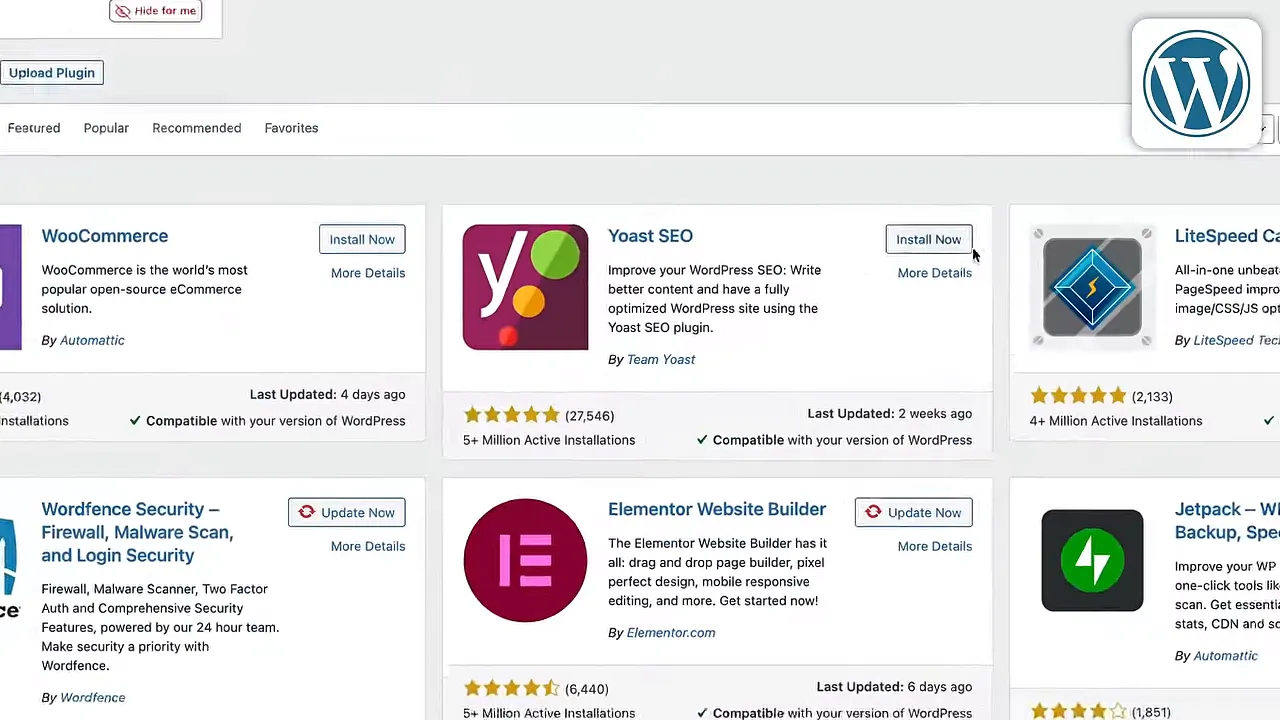
There are also thousands of free and paid themes. For visual page building without coding, Elementor adds a drag-and-drop editor.
That combination of themes, plugins, and page builders makes WordPress highly adaptable. The trade-off is that you need to spend more time learning how the pieces fit together.
WordPress costs
The WordPress software itself is free. For a simple website that does not need paid plugins or a premium theme, hosting can be the main platform expense.
The hosting provider I recommended was Hostinger, which I found fast, reliable, and easy to use. Its advertised entry pricing started at about $2 per month at the time. My referral promotion also included an additional 10% discount using the code METICSMEDIA, subject to the offer’s terms and availability.
My recommendation: Choose WordPress if you want extensive control over your website and are willing to invest time in learning and managing it. It is also a strong option for a tight budget and remains my first choice for someone who wants to build a blog with plenty of room to grow.
If that sounds like the right fit, my WordPress beginner tutorial covers the setup step by step.
Which Website Builder Should You Choose?
Each of these platforms makes sense for a different type of project. Here is how I would narrow the decision down:
- Choose GoDaddy for a simple, affordable website with minimal setup and limited customization needs.
- Choose Squarespace for an approachable editor, polished templates, strong blogging tools, and a good balance of flexibility and ease of use.
- Choose Wix for a wide variety of templates and more freedom to arrange your pages.
- Choose Webflow for detailed, custom design work when you are willing to handle a steeper learning curve.
- Choose Shopify when ecommerce is the main purpose of the website and you want a dedicated all-in-one store platform.
- Choose WordPress for extensive control, flexible functionality, and the ability to grow beyond a fixed website-builder feature set.
The key question is not just what you want your website to look like. It is also how much time you want to spend building and managing it.
A more powerful editor is not automatically a better choice. If a simpler platform does everything you need and helps you launch sooner, that can be the right decision. Choose the tool that fits your goals, then focus on building the website you actually want.


